FlowchartSystem architectureMedium
Microservices overview
High-level view of a microservices system with gateway, services, and shared datastores.
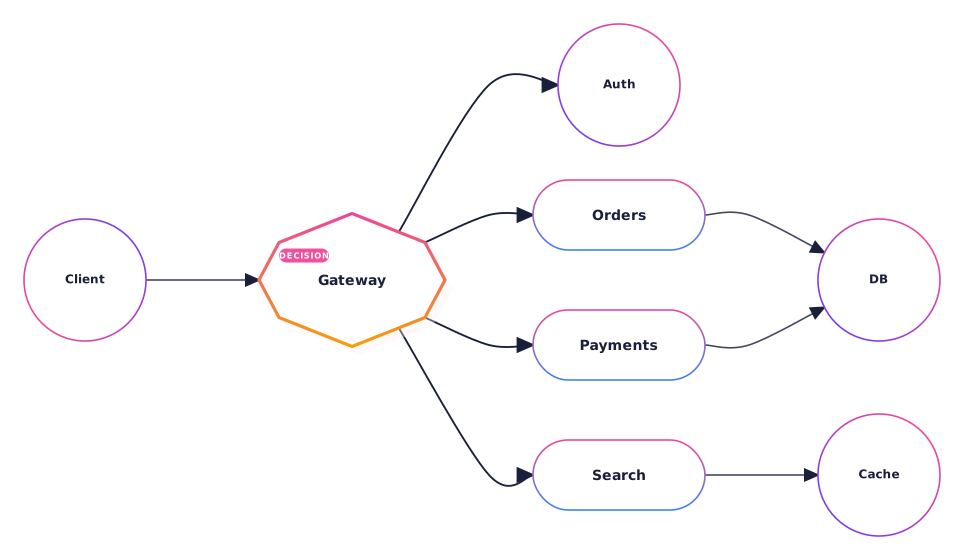
What this diagram shows
Step 01
Gateway fan-out
All client traffic lands on one gateway that routes into the right downstream service.
Step 02
Service isolation
Each domain — auth, orders, payments, search — owns its own service boundary.
Step 03
Shared storage
Services talk to a primary database and a cache layer instead of each other.
About flowchart diagrams
Flowcharts map out a process as boxes and arrows. They work well when you need to explain how a decision, workflow, or pipeline moves from one step to the next.
This template is written in Mermaid — plain text you can edit, version in git, and regenerate the image from any time.
View Mermaid sourcePlain-text diagram syntax — copy or edit directly.
diagram.mmd
1graph LR2 Client[Client]3 Gateway[API Gateway]4 Auth[Auth Service]5 Orders[Orders Service]6 Payments[Payments Service]7 Search[Search Service]8 DB[(Primary DB)]9 Cache[(Cache)]1011 Client --> Gateway12 Gateway --> Auth13 Gateway --> Orders14 Gateway --> Payments15 Gateway --> Search16 Orders --> DB17 Payments --> DB18 Search --> CacheRelated
Related templates
More templates that cover similar workflows.