
Auto-Generate Architecture Diagrams in CI from Your Spec Files
Your architecture diagram is wrong because it's a hand-maintained copy of the system. Here's how to make it a projection instead — generated from files CI already keeps honest.
TL;DR Architecture diagrams go stale because they're a hand-maintained copy of a system that changes without them. The fix is to stop maintaining the diagram and start generating it from a file your CI already forces to be correct —
compose.yml, an OpenAPI spec, a workspace manifest. This post is a real generator script, a GitHub Actions workflow in both postures (fail-on-drift and commit-back), and the four pitfalls that make the first attempt annoying. If you want to eyeball the generated source before wiring up CI, paste it into the editor first.
Your architecture diagram is wrong right now
Open your repo. Find docs/architecture.png or docs/architecture.md or whatever your team called it.
Check the last commit date on it.
I've done this at four different companies and the answer is always somewhere between eight months and "before my start date." The diagram shows a queue that was replaced by a webhook, a service that got merged into another service, and two boxes whose names no longer match anything in the repo. Somebody drew it during a design review, it was accurate for about six weeks, and then it quietly became fiction.
The usual explanation is "we don't have a culture of updating docs." I don't buy it. The same team keeps their API types in sync, their migrations ordered, and their lockfile committed — because CI fails when those drift. Nobody has ever failed a build because a PNG was out of date.
The actual problem is structural. An architecture diagram, as normally practised, is a copy of the system maintained by hand. Every hand-maintained copy of a changing thing drifts. That's not a discipline failure, it's just what copies do.
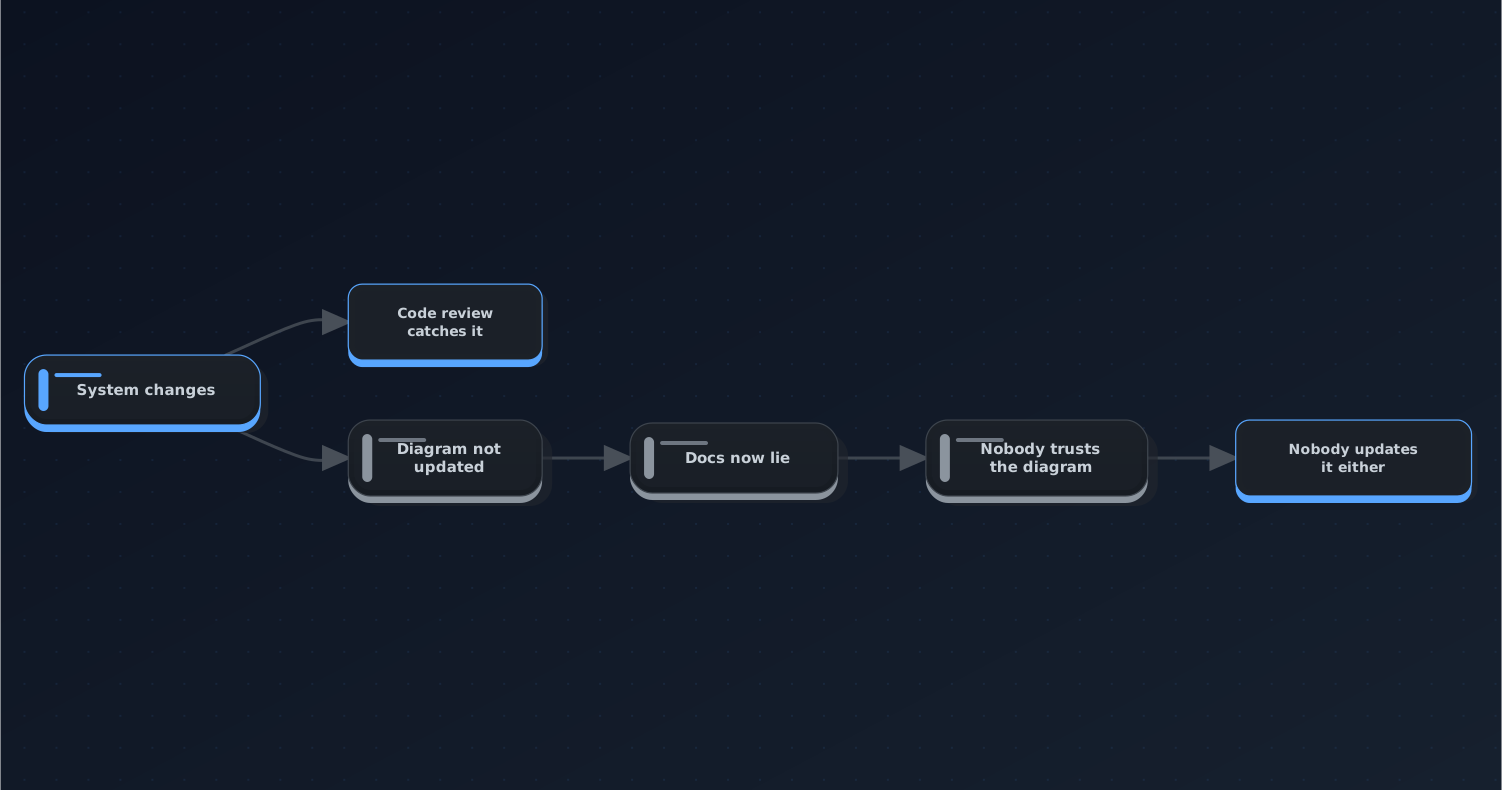
The drift loop. The last two steps are the ones that make it permanent — once a diagram is known to be wrong, updating it stops feeling worth the effort.
The way out is to stop treating the diagram as a document and start treating it as a projection: a derived artifact, regenerated from something that can't drift, enforced by the same CI that enforces everything else.
Step 1 — Find the file that's already true
You don't need a new source of truth. Your repo already has several, and they stay correct because something breaks when they don't.
| File you already have | Diagram it can project |
|---|---|
compose.yml / docker-compose.yml | Service topology, dependency order, which services are externally exposed |
openapi.yaml / openapi.json | Endpoint groups by tag, request/response flow, auth boundaries |
| Kubernetes manifests | Deployment → service → ingress wiring, namespace boundaries |
| Terraform state or plan output | Cloud resource graph, VPC / subnet layout |
package.json workspaces / go.mod / Cargo.toml | Internal package dependency graph in a monorepo |
.github/workflows/*.yml | Job dependency graph — surprisingly useful for a 12-job pipeline nobody understands |
| Your own routing table / DI container registration | Whatever your framework's actual wiring is |
The test for whether a file qualifies: if it were wrong, would something fail? compose.yml qualifies — get a service name wrong and nothing starts. A hand-written architecture.md does not qualify, because being wrong has no consequence.
Pick the one that best answers the question your diagram is supposed to answer. If new engineers keep asking "what talks to what," that's compose.yml or your k8s manifests. If the question is "what does this API actually expose," that's the OpenAPI spec.
Start with one. A repo with one correct generated diagram beats a repo with six generators nobody finished.
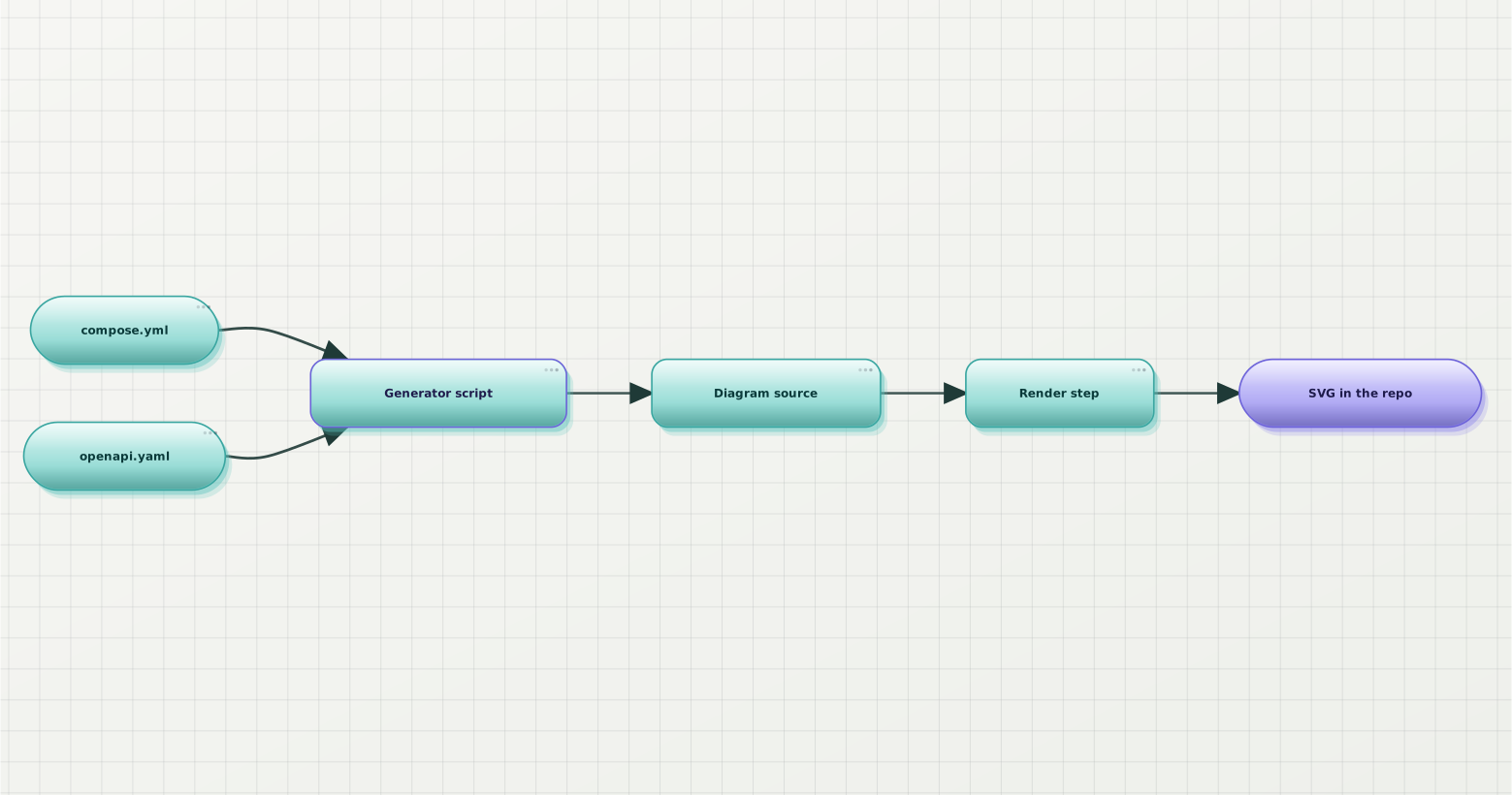
The shape of the whole thing. Two files that were already correct, one script, one render step, one committed artifact.
Step 2 — Write the generator
This is smaller than you expect. Here's a real one for compose.yml, in about 25 lines of Node:
// tools/gen-architecture-diagram.mjs
import { readFileSync, writeFileSync, mkdirSync } from "node:fs";
import { parse } from "yaml";

const compose = parse(readFileSync("compose.yml", "utf8"));

// Sort so the output is stable across runs — see step 3.
const services = Object.entries(compose.services ?? {}).sort(([a], [b]) =>
  a.localeCompare(b),
);

const id = (name) => name.replace(/[^A-Za-z0-9]/g, "_");

const lines = ["flowchart LR"];

for (const [name, def] of services) {
  // Services with published ports are entry points — draw them differently.
  const exposed = (def.ports ?? []).length > 0;
  lines.push(`  ${id(name)}${exposed ? `[["${name}"]]` : `["${name}"]`}`);
}

for (const [name, def] of services) {
  // depends_on is either a list (short syntax) or a map (long syntax).
  const deps = Array.isArray(def.depends_on)
    ? def.depends_on
    : Object.keys(def.depends_on ?? {});
  for (const dep of [...deps].sort()) {
    lines.push(`  ${id(name)} --> ${id(dep)}`);
  }
}

mkdirSync("docs/diagrams", { recursive: true });
writeFileSync("docs/diagrams/services.mmd", lines.join("\n") + "\n");Run it:
npm install yaml
node tools/gen-architecture-diagram.mjs
cat docs/diagrams/services.mmdThree details in there that took me a couple of iterations to get right:
depends_on has two shapes. The short syntax is a list of names; the long syntax is a map keyed by name with condition values under each. If you only handle the list case, half of real-world compose files silently produce a diagram with zero edges — which looks like a working diagram, which is worse than a crash.
Sanitise names into node IDs. Service names like api-gateway or redis.cache contain characters that break most diagram grammars. Keep the raw name as the visible label and use a scrubbed version as the ID.
Encode one piece of judgement, not zero. Here it's the exposed check — services with published ports get a different shape, so the diagram answers "where does traffic enter" without anyone annotating anything. A purely mechanical dump of every field produces a diagram that's accurate and useless. Pick the one or two distinctions that carry meaning and drop the rest.
Resist adding a fifth. The generator's job is to be boring and correct. Every rule you add is a rule that can be wrong.
Step 3 — Make the output deterministic, or the bot becomes noise
This is the step people skip, and it's the one that decides whether the whole setup survives contact with a real team.
If your generator iterates over an object and JavaScript's key order happens to shift, or if it stamps a "generated at" timestamp into the output, then every CI run produces a diff. The bot commits a meaningless change on every PR. Within two weeks everyone has learned to scroll past the diagram file, and you've built an elaborate machine for generating noise.
The rules:
- Sort everything. Every list, every object iteration.
localeCompareon the keys. This is the sort in the script above and it's not decorative. - No timestamps in the output. Not in a comment, not in a title. If you want provenance, put the source file path in a comment — that's stable.
- No absolute paths. They differ between your laptop and the runner.
- Pin the generator's dependencies. A YAML parser minor bump that changes key ordering will produce a diff you'll spend an hour blaming on your own code.
Test it the cheap way: run the generator twice in a row and diff the outputs.
node tools/gen-architecture-diagram.mjs
cp docs/diagrams/services.mmd /tmp/first.mmd
node tools/gen-architecture-diagram.mjs
diff /tmp/first.mmd docs/diagrams/services.mmd && echo "deterministic"If that prints deterministic, you can put it in CI. If it doesn't, fix it now — debugging non-determinism through a CI log is meaningfully worse than debugging it locally.
Step 4 — Pick a CI posture
There are two ways to enforce this, and they suit different repos. Pick deliberately; running both is how you get merge conflicts on a generated file.
| Check mode (fail on drift) | Commit-back mode | |
|---|---|---|
| What CI does | Regenerates, compares, fails if different | Regenerates, pushes the update to the PR branch |
| Contributor experience | Told to run a command locally | Nothing to do |
| Works on fork PRs | Yes | No — fork tokens are read-only |
| Needs write permissions | No | Yes (contents: write) |
| Diff noise | Zero — the diff is authored | One bot commit per PR that touches the spec |
| Failure mode | Red build until regenerated | Silent no-op if permissions are wrong |
| Best for | Open source, protected branches, monorepos | Internal repos, small teams |
Check mode is the safer default and the one I reach for first. It's honest — the diff appears in the PR authored by the person who caused it, which means it shows up in review alongside the change that motivated it. That's the whole point: the diagram update becomes reviewable evidence of an architecture change.
Commit-back mode trades that for convenience. Nobody has to remember a command. But it silently degrades on fork PRs, and its bot commits sit in your history forever.
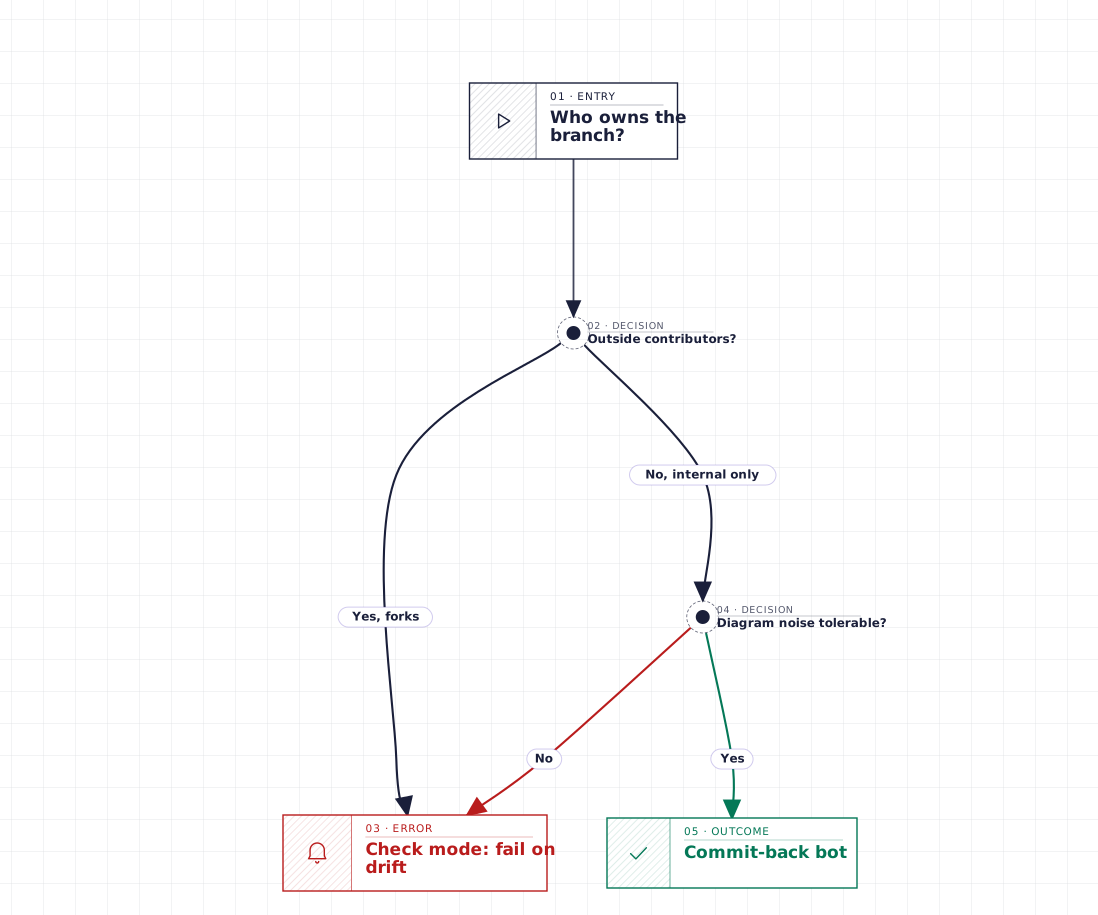
The short version: if anyone outside the org opens PRs, use check mode. Commit-back mode looks like it works on fork PRs, right up until it doesn't.
Here's check mode as a complete workflow:
# .github/workflows/diagrams.yml
name: Diagrams

on:
  pull_request:
    paths:
      - "compose.yml"
      - "tools/gen-architecture-diagram.mjs"
      - "docs/diagrams/**"

jobs:
  check:
    runs-on: ubuntu-latest
    steps:
      - uses: actions/checkout@v4

      - uses: actions/setup-node@v4
        with:
          node-version: 22
          cache: npm

      - run: npm ci

      - name: Regenerate diagram source
        run: node tools/gen-architecture-diagram.mjs

      - name: Render to SVG
        run: |
          npx @beauty-diagram/cli batch 'docs/diagrams/*.mmd' \
            --out-dir docs/diagrams \
            --format svg \
            --stop-on-error
        env:
          BEAUTY_DIAGRAM_THEME: atlas

      - name: Fail if the committed output is stale
        run: |
          git diff --exit-code -- docs/diagrams \
            || {
              echo "::error::Diagrams are out of date. Run 'make diagrams' and commit the result."
              exit 1
}The paths: filter matters. Without it this job runs on every PR, including ones that touch nothing but CSS, and people start ignoring it. Scope it to the spec file, the generator, and the output directory.
The --stop-on-error flag is the right call in CI specifically. By default the batch renderer keeps going so one bad file doesn't kill a large run; in CI you want a broken diagram to be a red build, since catching it is why the job exists.
And give contributors the exact local command in the error message. make diagrams beats "regenerate the diagrams," which beats nothing.
# Makefile
diagrams:
	node tools/gen-architecture-diagram.mjs
npx @beauty-diagram/cli batch 'docs/diagrams/*.mmd' --out-dir docs/diagrams --format svgFor commit-back mode, replace the last step with a push — and note the actor guard, which is not optional:
      - name: Commit regenerated diagrams
        if: github.actor != 'github-actions[bot]'
        run: |
          git config user.name  "github-actions[bot]"
          git config user.email "41898282+github-actions[bot]@users.noreply.github.com"
          git add docs/diagrams
          git diff --staged --quiet || git commit -m "chore(docs): regenerate architecture diagrams"
git pushThat workflow also needs permissions: contents: write at the job level, and actions/checkout needs with: { ref: ${{ github.head_ref }} } to push back onto the PR branch instead of the detached merge commit.
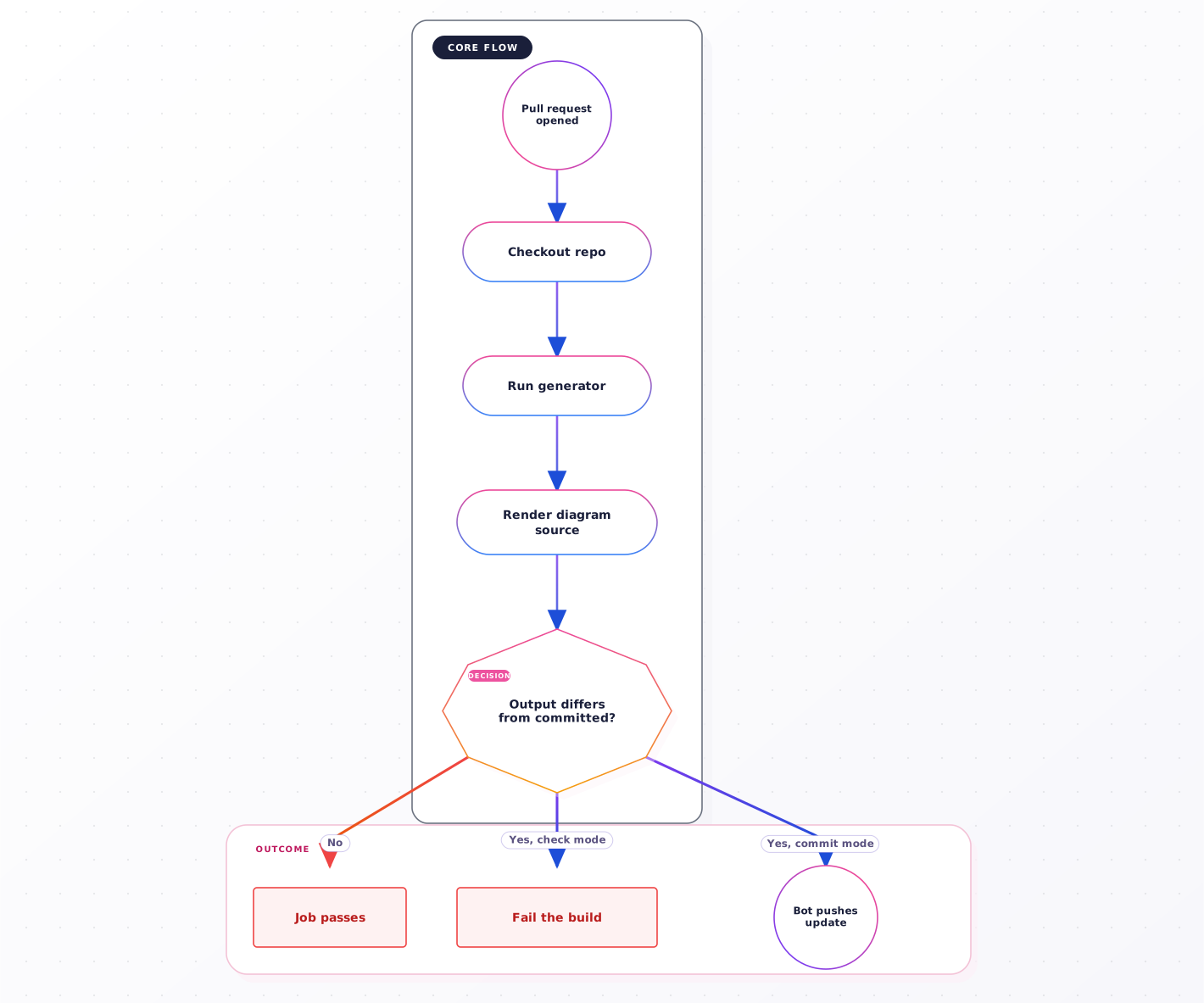
Both postures share the first four steps. They only diverge at the comparison — one fails the build, one pushes a commit.
The four pitfalls
Things that cost me time so they don't have to cost you any:
Fork PRs get a read-only token. Commit-back mode doesn't error on a fork PR — it runs, the push fails, and depending on how you wrote the step, the job may still go green. You end up with a "working" automation that quietly does nothing for exactly the contributors you least want to inconvenience. If your repo takes outside PRs, use check mode.
Bot commits don't retrigger workflows. Pushes made with the default GITHUB_TOKEN don't fire new push / pull_request events. This is usually described as a limitation; here it's the feature that stops your commit-back job from triggering itself in a loop. Don't "fix" it by swapping in a PAT unless you've thought carefully about the loop.
Committing rendered output is a real tradeoff. An SVG in the repo means the diagram renders in your README and on any wiki without a build step — that's worth a lot. It also means a ~15 KB file whose diff is unreadable. The compromise I've settled on: commit both the generated source and the SVG, and in review, read the source diff. Two lines of changed diagram source tells you exactly what moved; the SVG diff tells you nothing.
Don't put the generator behind a pre-commit hook. It's tempting — regenerate on every commit, never drift. In practice it slows down every commit in the repo for a file that changes monthly, and hook installation is never universal across a team. CI is the right enforcement point precisely because nobody can skip it.
When you want the output to look like something
Everything above works with any renderer. The generator emits diagram source; whatever renders it is a separate decision.
The reason it becomes an interesting decision is that a generated diagram gets looked at more than a hand-drawn one. It's in the README, it's current, so people actually read it — which means its legibility now matters. And the stock output of most diagram renderers is dense, cramped, and visibly a default. A 14-service topology with default spacing is technically correct and practically unreadable.
The open-source path is theme variables. Mermaid takes an %%{init: ...}%% directive with theme overrides; you can inject one at the top of the generated source and tune the palette. It works. You'll spend an afternoon on it, and you'll spend another afternoon on it the first time you add a diagram type the theme wasn't tuned for.
The path I'd take first is visual: generate the source, then paste it into the Beauty Diagram editor and look at it across a few themes before you commit to anything. That loop matters more than it sounds, because your generator's first output is usually wrong in a way that's obvious visually and invisible in text — thirty nodes where you expected twelve, or an edge direction that reads backwards. Nine themes are available (classic, modern, atlas, blueprint, memphis, obsidian, slate, brutalist, atelier); pick one, then hard-code that choice in CI. (Disclosure: I work on Beauty Diagram.)
Beauty Diagram renders Mermaid, PlantUML, and .drawio source into nine production themes — from the browser while you're iterating on the generator, and from the CLI once it's wired into a workflow. The renderer works anonymously, so a CI job doesn't need credentials. (Disclosure: I work on it.)
Try the editor →Once you've picked a theme, the CI half is one command:
# Render every generated source file in one pass
npx @beauty-diagram/cli batch 'docs/diagrams/*.mmd' \
  --out-dir docs/diagrams \
  --format svg \
  --stop-on-error

# Or a single file, with the theme passed explicitly
npx @beauty-diagram/cli beautify docs/diagrams/services.mmd \
  --theme atlas \
--out docs/diagrams/services.svgRendering doesn't require an account, so this drops into a workflow without adding a secret. If your generator emits PlantUML or you're projecting from legacy .drawio files, the same commands accept those too — the source format is detected from the extension.
Wrap-up
The checklist:
- Stop maintaining the diagram; project it. A hand-maintained copy of a changing system always drifts. This isn't fixable with discipline.
- Pick a file that's already true.
compose.yml, an OpenAPI spec, k8s manifests, a workspace manifest. The test: if it were wrong, would something fail? - Sort everything and drop timestamps. Non-deterministic output turns the automation into noise, and noise gets ignored within two weeks.
- Default to check mode. Fail the build on drift and tell the contributor the exact command. It keeps the diagram diff in the PR that caused it, where review can see it.
- Commit the generated source alongside the rendered output. Review the source diff; the rendered diff is unreadable by design.
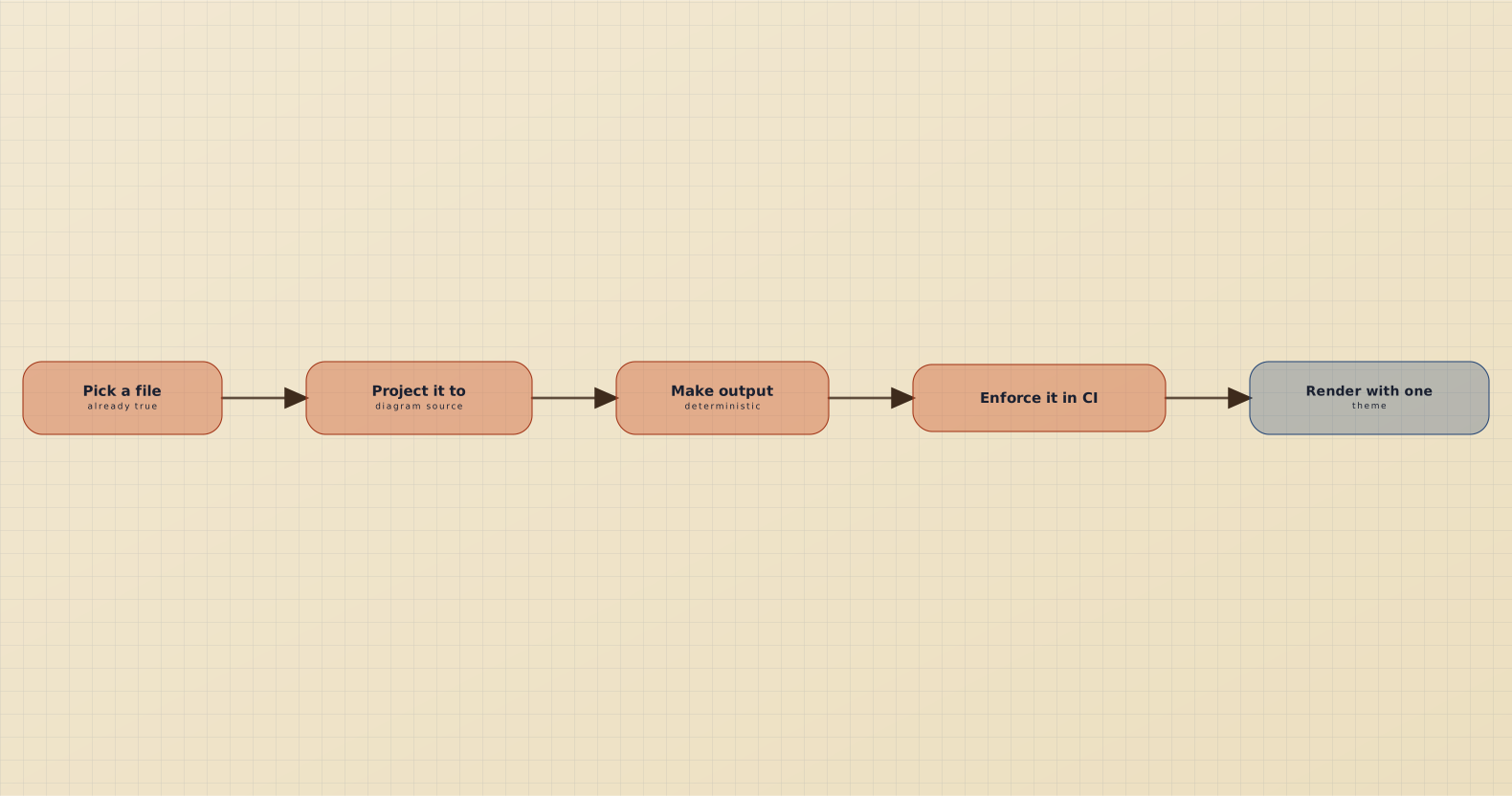
Five steps. The third one is the one that decides whether the other four survive a month.
If this was useful, drop a ❤️ and follow — I'm posting weekly on diagrams, docs, and developer ergonomics. Next week: I Rendered 500 Diagrams from Real OSS Repos. Here's What Devs Get Wrong.
What's the oldest diagram in your repo, and how wrong is it? I want to know whether the eight-months-to-never range holds up outside the companies I've worked at.
Continue reading
Beautify Every Diagram in Your Markdown Docs with One Command
A docs repo has dozens of Mermaid blocks, half on the default pastel theme, some broken. Two commands plus a CI gate render them all to one consistent theme — and keep them that way.
Which Tools Support Mermaid Natively? A Checked List
GitHub, GitLab, Notion, Obsidian, VS Code and Azure DevOps render Mermaid natively. Confluence, Slack and Google Docs do not. Every row checked against the vendor's own documentation.