
Beautify Every Diagram in Your Markdown Docs with One Command
A docs repo has dozens of Mermaid blocks, half on the default pastel theme, some broken. Two commands plus a CI gate render them all to one consistent theme — and keep them that way.
TL;DR A typical docs repo has dozens of Mermaid blocks scattered across markdown files, each rendering with whatever default Mermaid theme the consumer site picked, none of them consistent with each other. This post walks the two-command path —
bd extractto pull every fenced block out of markdown,bd batchto render them all to themed SVGs, and a small markdown rewrite to embed the SVGs back via<picture>. The same pipeline drops into a GitHub Actions workflow at the end. If you want to try a single file first, the editor renders one block at a time.
The state of diagrams in most docs repos
Open any mid-sized open-source repo with substantial docs — kubernetes/kubernetes, prometheus/prometheus, vercel/next.js. Search the markdown tree for ```mermaid. You'll find 30 to 100 blocks across docs, contributing guides, RFC archives, and stale design notes.
Then look at how those diagrams actually render. Three observations, every time:
- Most diagrams use Mermaid's default theme — the pastel one with the muted blues and the soft drop-shadows. It's fine in isolation. Across 40 diagrams in a single docs site, it reads as "nobody owned this."
- Some diagrams are silently broken. A typo in a
flowchartarrow, an unclosedsubgraph, anerDiagramfield that no longer parses on the current Mermaid version. The page renders, the diagram block becomes an error message, nobody notices for six months because nobody reads the contributing guide that often. - The diagrams that DO look good are the recent ones. Whoever shipped them most recently set a theme in an
initblock at the top of the diagram. Older blocks don't have the directive. The site looks like geological strata of "whatever Mermaid theme was fashionable that quarter."
You can fix all three by hand. Open every markdown file, paste each Mermaid block into a renderer, eyeball it, fix syntax errors, prepend an init directive with your preferred theme, save. For a 60-file docs repo that's maybe a day of mechanical work — and it'll drift again in three months because every new contributor adds blocks without the directive.
Or you can build a two-command pipeline that does this automatically and run it in CI.
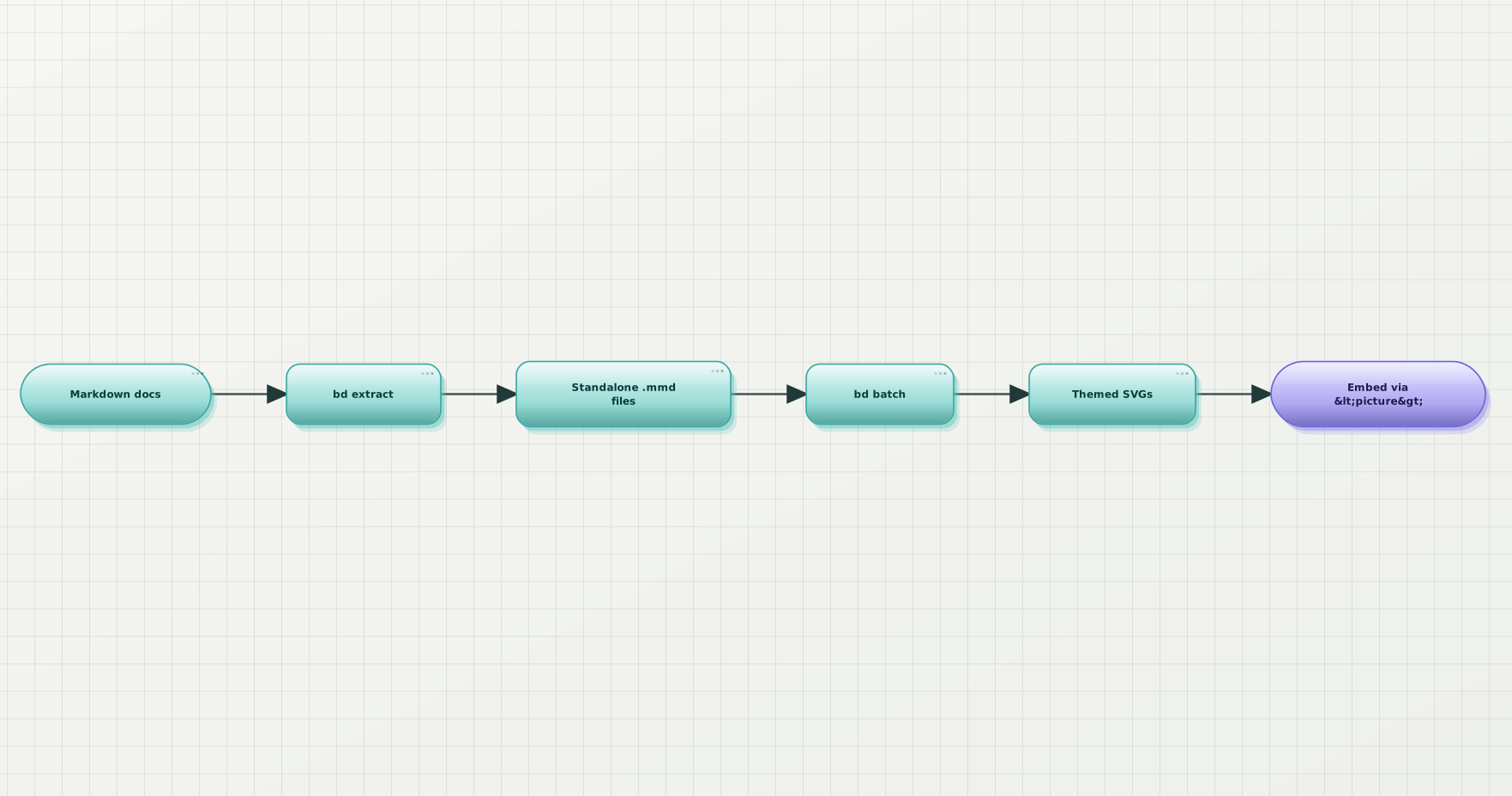
The pipeline this post builds: extract every fenced diagram out of markdown, render them all in one batch, embed the SVGs back so the rendered page shows your themed version while the markdown source still holds the original code.
Why bake the SVG into the page (instead of letting the site render Mermaid live)
A reasonable counter-argument: "My doc site already renders Mermaid client-side via mermaid.js. Why pre-render at all?"
Three reasons the pre-render path wins for docs:
- Consistency across surfaces. Your README on GitHub, your VS Code marketplace listing, your npm page, your Docusaurus site, your printed PDF export — all render Mermaid differently (or not at all). A pre-rendered SVG looks the same everywhere because there's no rendering left to do.
- Bundle weight. mermaid.js minified is around 600 KB. If the only reason your docs ship it is the four diagrams on your architecture page, you're paying a meaningful payload tax for every visitor of every other page.
- The diagram becomes a real asset. Once it's an SVG on disk you can review it in PRs (the diff is the SVG file, which renders in GitHub's PR view), you can run an
<img>accessibility check on it, and you can link to it from outside the docs site.
The pipeline below keeps the Mermaid source in the markdown — so contributors still edit Mermaid, not SVG — but renders to an SVG asset alongside it. The <picture> embed shows the SVG to readers; the source block becomes a collapsed <details> for anyone who wants to see the code.
Step 1 — bd extract pulls every diagram out of markdown
npx @beauty-diagram/cli extract docs/**/*.md --assets-dir docs/_diagramsThis walks every markdown file matching the glob, finds every fenced ```mermaid (and ```plantuml) block, and writes each one to a standalone source file under the assets directory. Filename is derived from the markdown file path plus a stable hash of the block contents, so re-running on an unchanged docs tree is a no-op.
A typical output:
docs/_diagrams/
  architecture/
    overview-a3f9c1.mmd
    overview-b8e240.mmd
    auth-flow-7c2105.mmd
  contributing/
    pr-lifecycle-91d8a2.mmd
  guides/
request-path-4e1c80.mmdA few flags worth knowing:
--dry-runlists what would be written without touching disk. Run this first to see how many blocks your repo actually has.--cleanremoves orphaned source files in the assets directory before extracting — useful when blocks get deleted from markdown and you don't want stale.mmdfiles lying around.--concurrency <n>controls parallel parsing for very large doc trees. The default is sensible; only touch it if you're indexing thousands of files.
If a block has a syntax error, bd extract still writes the source file and prints a warning. The block is real even if it's broken; the next step decides what to do with broken blocks.
Step 2 — bd batch renders them all to themed SVGs
npx @beauty-diagram/cli batch docs/_diagrams/**/*.mmd \
  --out-dir docs/_diagrams \
--format svgThis renders every extracted source file to an SVG sibling. Same filename, different extension. Theme is whichever one you set globally — BEAUTY_DIAGRAM_THEME=modern in the environment, or passed per-file via the source's own init directive.
You'll get output like:
✓ docs/_diagrams/architecture/overview-a3f9c1.svg (1142×680)
✓ docs/_diagrams/architecture/overview-b8e240.svg (980×420)
✓ docs/_diagrams/architecture/auth-flow-7c2105.svg (1240×910)
✗ docs/_diagrams/contributing/pr-lifecycle-91d8a2.mmd: parse error at line 14
✓ docs/_diagrams/guides/request-path-4e1c80.svg (860×540)

4 succeeded, 1 failedThe --stop-on-error flag flips the failure mode: by default bd batch keeps going so one bad diagram doesn't tank a 200-diagram run. In CI you'll usually want --stop-on-error so a broken block fails the build, which is the whole point of running this in CI to begin with.
--concurrency defaults to a reasonable parallelism for your CPU; raise it on a big CI runner if the batch takes long enough to matter.
The "consistency" payoff lands here. The same theme renders every diagram across the entire docs tree.
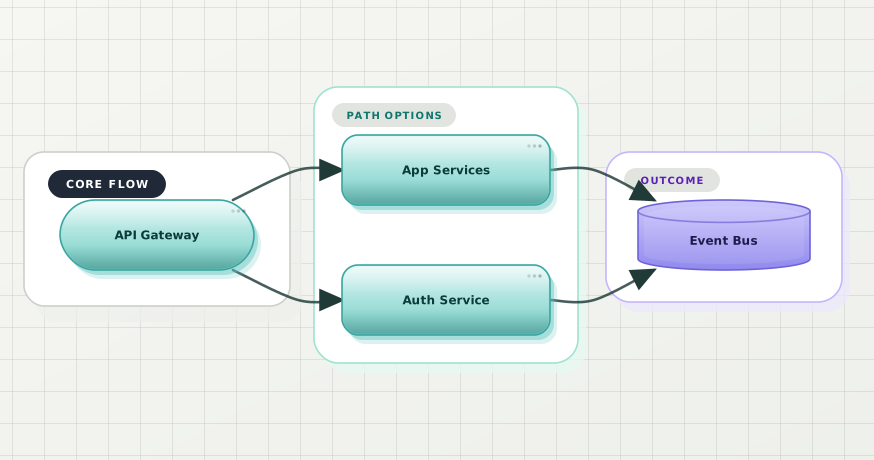
A typical architecture diagram rendered with a single chosen theme. The consistency story is that every one of your 40 docs diagrams comes out looking like this one — same stroke weight, same palette, same edge style.
Step 3 — Embed the SVGs back via <picture>
The extract / batch pair gave you SVG files. The markdown still holds the original Mermaid source. Now you decide how the rendered page should reference the asset.
The cleanest pattern is <picture> with the SVG as the primary source and a collapsed <details> for the original code:
<picture>
  <img
    src="/_diagrams/architecture/overview-a3f9c1.svg"
    alt="High-level system architecture: API gateway, auth service, app services, and the shared event bus"
  />
</picture>

<details>
<summary>Mermaid source</summary>

```mermaid
flowchart LR
  Gateway[API Gateway] --> Auth[Auth Service]
  Gateway --> App[App Services]
  App --> Bus[(Event Bus)]
```

</details>Why this shape:
- The reader sees the SVG by default — themed, crisp, no client-side rendering cost.
- The source is one click away for anyone who wants to copy it into their own diagram, file a fix, or learn from the syntax.
- The markdown file remains the source of truth. A contributor editing the doc edits the Mermaid block, runs the pipeline, commits both the updated source and the regenerated SVG.
Most static site generators (Docusaurus, VitePress, MkDocs, Hugo, Astro) render <picture> and <details> natively. GitHub's markdown renderer does too, including in PR descriptions. The pattern is portable.
If you'd rather not maintain the dual source + asset embed by hand, the extract step has a --rewrite mode that updates the markdown file in place — collapsing the fenced block into the <picture> + <details> pair on first run, leaving it alone on subsequent runs.
Step 4 — Wire it into CI so it stays beautified
A small GitHub Actions workflow that fails any PR introducing a broken diagram or skipping the regeneration:
name: Beautify docs

on:
  pull_request:
    paths:
      - 'docs/**/*.md'
      - 'docs/_diagrams/**'

jobs:
  beautify:
    runs-on: ubuntu-latest
    steps:
      - uses: actions/checkout@v4
      - uses: actions/setup-node@v4
        with:
          node-version: '20'
      - name: Extract diagrams from markdown
        run: |
          npx @beauty-diagram/cli extract 'docs/**/*.md' \
            --assets-dir docs/_diagrams \
            --clean
      - name: Render every diagram
        run: |
          npx @beauty-diagram/cli batch 'docs/_diagrams/**/*.mmd' \
            --out-dir docs/_diagrams \
            --format svg \
            --stop-on-error
        env:
          BEAUTY_DIAGRAM_THEME: modern
      - name: Fail if anything changed
        run: |
          git diff --exit-code docs/_diagrams || (
            echo "::error::Diagrams are out of date. Run the beautify pipeline locally and commit the result."
            exit 1
)The git diff --exit-code at the end is the trick. The job regenerates everything from scratch on every PR; if the output differs from what's checked in, the PR failed to run the pipeline before pushing, and the build fails. Contributors learn the workflow once and it stays automatic forever.
For a Makefile-driven repo, the same pattern collapses to two targets:
diagrams:
	npx @beauty-diagram/cli extract 'docs/**/*.md' --assets-dir docs/_diagrams --clean
	npx @beauty-diagram/cli batch 'docs/_diagrams/**/*.mmd' --out-dir docs/_diagrams --format svg --stop-on-error

verify-diagrams: diagrams
git diff --exit-code docs/_diagramsmake diagrams regenerates locally; make verify-diagrams is what CI calls.
Beauty Diagram's CLI ships extract + batch as the docs-scale pair, so the same renderer that handles a single file in the editor handles a hundred files in CI. Pick a theme once, apply it everywhere, and let the git-diff check keep contributors honest. (Disclosure: I work on it.)
Try one diagram in the editor →The fastest way to feel the workflow is one file at a time in the editor — paste a Mermaid block from your docs repo, pick a theme, see whether the result is the consistency you want. Once you've picked a theme you like:
# Install once
npm install -D @beauty-diagram/cli

# Set the theme for the whole repo
export BEAUTY_DIAGRAM_THEME=modern

# Run the pipeline locally
npx bd extract 'docs/**/*.md' --assets-dir docs/_diagrams --clean
npx bd batch 'docs/_diagrams/**/*.mmd' --out-dir docs/_diagrams --format svg

# Commit the assets and the rewritten markdown
git add docs/_diagrams docs/**/*.md
git commit -m "Beautify docs diagrams"bd beautify, bd export, bd extract, and bd batch all work anonymously for rendering. The paid tier kicks in for AI features (bd ai generate) and higher quotas; the docs-pipeline use case lives entirely inside the free surface.
When NOT to pre-render
A few cases where the live-Mermaid-in-the-browser path is the better trade:
- Your docs site already ships mermaid.js for other reasons. If the bundle cost is paid, you're not saving anything by pre-rendering. Use
initdirectives in your Mermaid blocks to set a consistent theme and call it done. - Diagrams change every commit. A README that auto-regenerates an architecture diagram from the codebase on every push has no use for pre-rendered assets — the SVG would be stale by the next push. Live rendering at view time is the right call.
- You only have three diagrams. The batch pipeline pays off when there are enough diagrams that consistency is the problem. Three diagrams you can keep coherent by hand.
- Your audience needs the source visible by default. A Mermaid tutorial, a "diagrams as code" RFC, a contributing guide. Pre-rendering hides the syntax behind a
<details>; if the syntax IS the point, leave it as a fenced block.
The rule of thumb: pre-render when the diagram is a doc asset (read, not edited, by most readers); live-render when the diagram is the doc.
Wrap-up
Three takeaways:
- Diagrams in docs repos drift the same way docs drift. Different themes, broken blocks, no review process. The fix is the same fix you applied to docs: a build step + a CI gate.
- The two-command pipeline is
bd extract+bd batch. Extract pulls every fenced block to standalone source files; batch renders all of them to themed SVGs. The git-diff CI check keeps the output in sync. - Embed via
<picture>+ collapsed<details>. Reader sees the themed SVG, contributor still edits Mermaid, source of truth stays in markdown.
If this was useful, drop a ❤️ and follow — I'm posting weekly on diagrams, docs, and developer ergonomics. Next week: Beautify Mermaid Diagrams in Obsidian and VS Code (Without Leaving Your Editor).
How many Mermaid blocks does your docs repo have right now? Run grep -r '```mermaid' docs/ | wc -l and drop the number in the comments — I'm collecting "diagrams per docs repo" data and the spread is wider than you'd guess.
Continue reading
Auto-Generate Architecture Diagrams in CI from Your Spec Files
Your architecture diagram is wrong because it's a hand-maintained copy of the system. Here's how to make it a projection instead — generated from files CI already keeps honest.
Which Tools Support Mermaid Natively? A Checked List
GitHub, GitLab, Notion, Obsidian, VS Code and Azure DevOps render Mermaid natively. Confluence, Slack and Google Docs do not. Every row checked against the vendor's own documentation.