
Diagrams as Code in 2026: Mermaid, PlantUML, D2, Excalidraw — When to Use What
Four diagrams-as-code tools are worth learning in 2026. Each is best at a different job — a comparison, plus the honest tradeoffs nobody puts on the marketing page.
TL;DR Mermaid is the default because it's everywhere, PlantUML is the workhorse for anything sequence-heavy or UML-shaped, D2 is what you pick when layout quality is the deciding factor, and Excalidraw is the sketch tool that happens to have a text format. Any team picking one tool for all four jobs is going to be unhappy at least twice. This post is which one to reach for when, with the tradeoffs nobody puts on their landing page.
Why there are four answers, not one
Every quarter someone posts "which diagrams-as-code tool should I pick" on Reddit or Hacker News and the reply thread is a genre in itself. Three people say Mermaid because it's already in GitHub. Two people say PlantUML because they've been using it since 2015 and the sequence diagrams "just work". One person swears by D2. Someone at the bottom mentions Excalidraw and gets misunderstood as suggesting a whiteboard tool.
They're all right. They're each answering a slightly different question.
The reason there isn't a single winner is that "diagrams as code" isn't one job. Sketching a system on a whiteboard so a new hire can follow along is not the same job as documenting a payment webhook flow in an API reference. And neither of those is the same job as embedding a class hierarchy in a Javadoc-adjacent doc site. The tools that got popular each optimised for one of those jobs and paid a price on the others.
Once you accept that, the picking process gets a lot easier. You stop looking for "the best" and start asking "which job am I doing right now, and which tool was designed for it?"
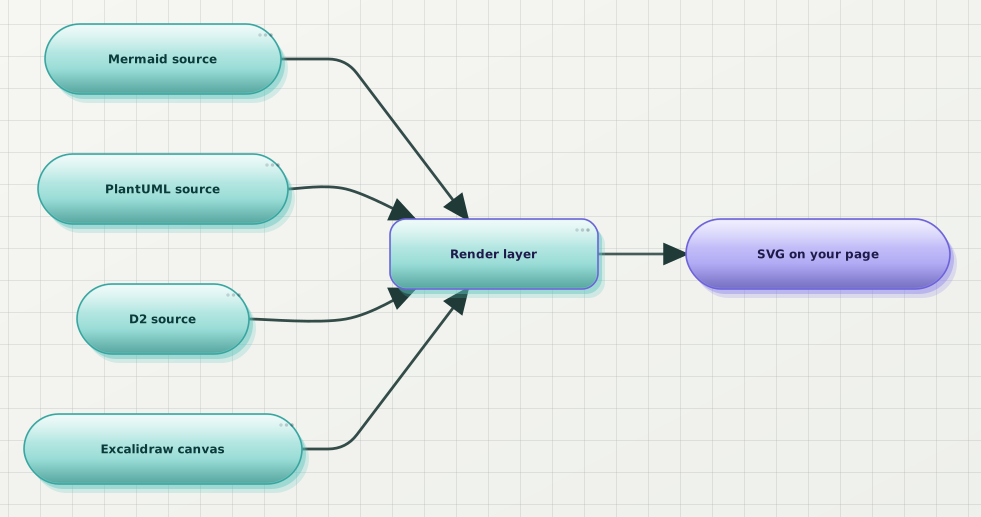
Four common inputs, one shared output. The interesting question is what happens between the source file and the render — that's where the tools disagree.
The four tools worth knowing
Mermaid
Mermaid is the JavaScript-native, browser-first, Markdown-friendly one. If you type ```mermaid in a GitHub README, in a Notion doc (via the community plugins), in a Docusaurus site, in Obsidian, in Gitea, in Bitbucket — it renders. That reach is Mermaid's actual superpower. The syntax is a distant second.
What it's good at:
- Ubiquity. More platforms speak Mermaid than any other diagrams-as-code format. Docs written in Mermaid don't get stranded if you migrate wikis.
- Live-editing loops in prose editors. VS Code, Obsidian, Notion, and (increasingly) LLM chat interfaces all render Mermaid as you type. That matters more than any single grammar feature.
- Flowcharts, sequence diagrams, class diagrams, ER diagrams, gantt charts, mindmaps, timelines. Broad coverage, none of it particularly deep, all of it good enough.
What it's not good at:
- Layout quality. The default output is dense and slightly cramped. Long node labels wrap awkwardly. Edges cross more than you'd expect on medium-complexity diagrams. There are workarounds (subgraphs, direction hints,
linkStyle) but the ceiling is low. - Consistent typography. Different renderers (GitHub, VS Code, Docusaurus) produce visibly different output for the same source. Fonts, spacing, palette — none of it is stable across surfaces.
- Anything complex enough to need real layout thinking. Above ~15 nodes, most Mermaid diagrams stop being legible without heavy manual restructuring.
Use Mermaid when the diagram is going to live inside prose and the prose is what matters. It's the format equivalent of choosing Markdown over InDesign for a README: not the best-looking, but the one every downstream tool can consume.
PlantUML
PlantUML is the Java-native, server-rendered, formally-defined one. It was designed by people who wanted to draw UML — real UML, with the correct arrowheads for aggregation vs composition, with proper sequence diagram lifelines that support activation bars and multi-return, with activity diagrams that predate the phrase "diagrams as code" by a decade.
What it's good at:
- Sequence diagrams. This is where PlantUML is genuinely uncontested. Multi-participant, nested activations, alt/else/opt/loop blocks, notes-over-multiple-participants — it renders all of it correctly and legibly, without you having to fight the layout. Anyone documenting async flows or auth handshakes should reach for PlantUML first.
- Class and component diagrams. Full UML notation, correct arrowhead vocabulary, proper package boundaries. If your team writes docs that will be read by people who care about
<<interface>>and generalisation vs realisation, PlantUML respects that. - Formal notation coverage. Activity, state, deployment, use-case, timing diagrams — all supported, all with the standardised notation.
What it's not good at:
- Local rendering ergonomics. The reference implementation is a Java jar. You either run a local server, use a hosted renderer, or wire up a CI step. There's no browser-native option that matches the reference output.
- Aesthetic defaults. The out-of-the-box PlantUML render looks like a 2006 UML textbook. It's fine for internal docs; it's rough on a product landing page.
- Non-UML shapes. If you want a system-architecture diagram that isn't strictly UML — flexible clusters, custom shapes, freeform grouping — PlantUML fights back.
Use PlantUML when the diagram is going to be read by engineers looking for signal, not style. Sequence diagrams especially: I don't reach for anything else.
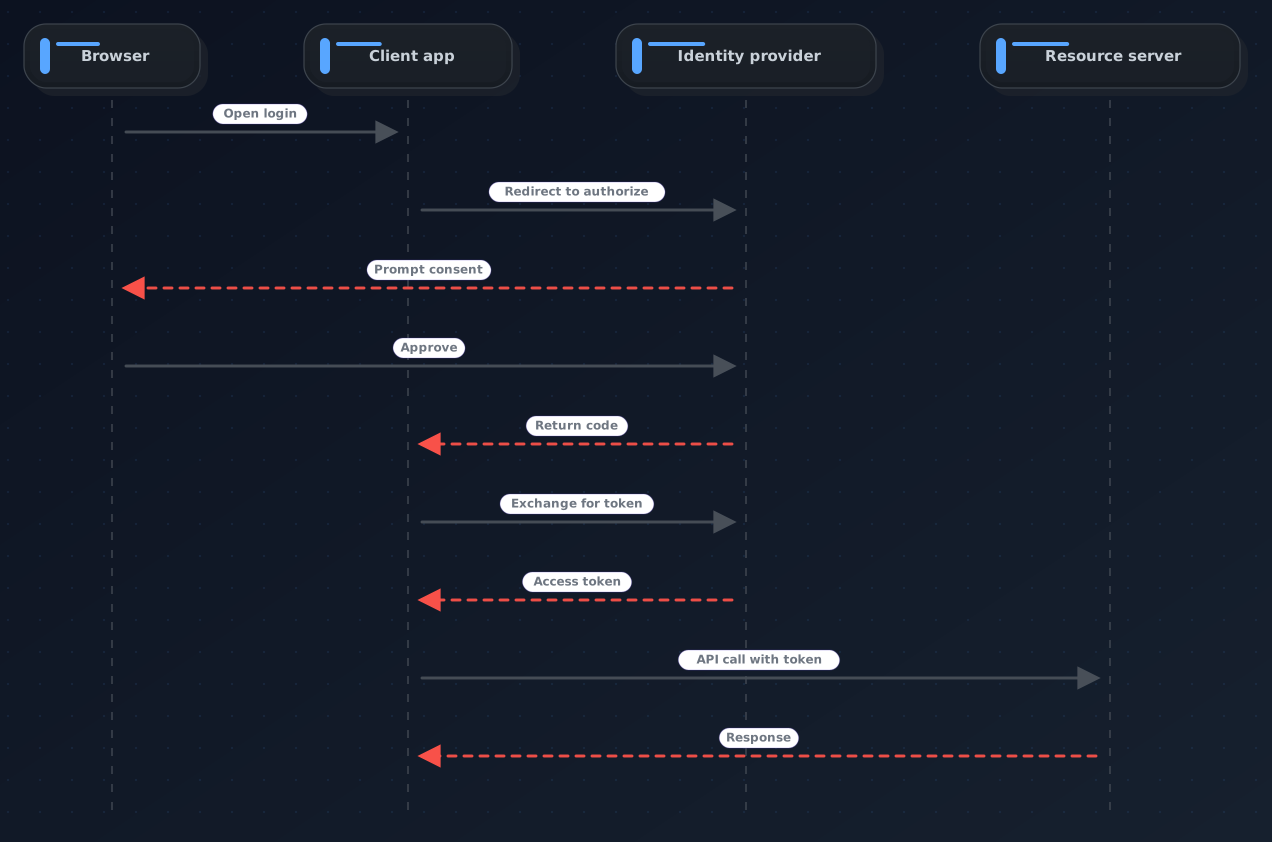
The sequence-diagram case is the one place where "I'd use PlantUML" is the reflexive right answer, even in 2026. The notation vocabulary is deeper than any competitor's.
D2
D2 is the newest of the four and the one most likely to be new to you. It came out of a small team that had spent enough time frustrated with the layout quality of the others to build a modern alternative. Released 2022, matured through 2023-2024, and by 2026 it's the tool I recommend to anyone who's tried Mermaid and thought "this could look so much better".
What it's good at:
- Layout quality. D2 uses a modern layout engine (ELK by default, TALA optionally) and the output shows it. Edges route intelligently, node clusters read as clusters, dense diagrams stay legible in places where Mermaid would have started overlapping edges. This is the single strongest argument for D2.
- A grammar designed by people who used the others. Shapes and connections have a syntax that feels like it was designed after learning from Mermaid, PlantUML, and Graphviz. Nested containers, edge labels, sql_table shorthand, connection direction — the ergonomic wins add up.
- First-class themes. D2 ships with a set of themes and a theme SDK. The stock themes look modern in a way that Mermaid's stock themes don't.
What it's not good at:
- Ecosystem reach. GitHub doesn't render D2 blocks natively. Notion doesn't. Most doc-site plugins are third-party. If your diagram source needs to live inside a README and render on GitHub, D2 is not the answer.
- UML-specific notation. D2 is a general-purpose diagramming DSL. It draws sequence diagrams and class diagrams, but the vocabulary is more general than PlantUML's — no
<<enumeration>>stereotype, no aggregation/composition arrowhead distinction. - Team familiarity. Everyone on your team already knows Mermaid. Introducing D2 has a real onboarding cost.
Use D2 when you own the rendering pipeline (a docs site, a design system's static assets, a marketing page) and layout quality is the reason the current tool isn't cutting it. In 2026 my rough test is: if the diagram is going into a repo README, Mermaid; if it's going into a hand-crafted docs site, D2 is worth the switch cost.
Excalidraw
Excalidraw belongs on this list because it now has a text format (.excalidraw JSON is fully specified, and there's an excalidraw-text DSL for authoring). But it doesn't belong for the same reason the others do. The point of Excalidraw isn't precise syntax — it's the deliberate hand-drawn look. It's the tool you use when you want the diagram to say "we're still figuring this out, so don't over-index on the arrows".
What it's good at:
- Sketch aesthetic. The Rough.js-based rendering makes every diagram look like a whiteboard photo. Product designers, RFC authors, and technical bloggers reach for this specifically because it signals "provisional".
- Direct manipulation. The web canvas is fast, keyboard-shortcut-heavy, and the export is a real
.excalidrawfile that can be committed to a repo and edited by anyone with the same tool. - Collaboration. The multi-user canvas mode is the best in class for "let's whiteboard this on a call".
What it's not good at:
- Pure diagrams-as-code workflows. Yes, you can hand-write
.excalidrawJSON. Practically nobody does. Excalidraw is a canvas-first tool with a persistable format, not a text-first tool with a rendering pipeline. - Automated regeneration. You don't
CI: render diagrams from Excalidraw source— you draw them, export them, commit the SVG, and move on. - Layout consistency across many diagrams. Every Excalidraw diagram is hand-arranged. That's the point. But it means the tenth diagram in a doc series is going to look inconsistent with the second one.
Use Excalidraw when the diagram is a sketch and should read like one. Do not use it as your team's default diagramming tool — it's the wrong choice for anything that has to be regenerated automatically or read by a wide audience without visual context.
The comparison matrix
The version you can actually reason from:
| Dimension | Mermaid | PlantUML | D2 | Excalidraw |
|---|---|---|---|---|
| Where it renders natively | GitHub, GitLab, Notion (plugin), Obsidian, most doc sites | Anywhere with a jar or hosted renderer | Docs sites via plugin; not GitHub | Its own canvas + committed SVG |
| Layout quality | Fair | Fair (great for sequences) | Excellent | N/A (manual) |
| Sequence diagram support | Good | Excellent | Good | Poor |
| UML vocabulary depth | Basic | Complete | Basic | None |
| Aesthetic defaults | Dated | Dated (textbook) | Modern | Distinctive (sketch) |
| Local render setup | Zero | Java runtime or hosted | Single binary | Web app / desktop app |
| AI / LLM output quality | Excellent | Good | Fair | Poor |
| Team onboarding cost | Low | Low-medium | Medium | Low (canvas) / High (source) |
| Best when | Docs live inside prose | Sequence & UML docs | Owned docs site, layout matters | Sketching, RFCs, "we're figuring it out" |
The two rows most people underweight: "where it renders natively" and "AI / LLM output quality". Both are downstream of ubiquity, and ubiquity is Mermaid's real moat. When a design partner asks Claude or ChatGPT for a diagram, they get Mermaid. When a junior engineer opens a fresh doc, they type ```mermaid. That gravity is hard to fight even when a competitor is technically better.
Honorable mentions
Two tools that come up in these debates but don't quite fit the "diagrams as code" bucket cleanly enough for this post:
- draw.io / diagrams.net: canvas-first, with
.drawioXML as the persistable format. You can commit the XML and re-render it, but nobody writes it by hand. It's a canvas tool whose file format happens to be legible. If you're already using it, there's a separate path for treating the .drawio XML as source and re-rendering it in a theme you control — but it's not the tool you'd pick from scratch for a diagrams-as-code workflow. - Structurizr / C4-DSL: purpose-built for the C4 model of software architecture. If your team commits to C4 as the way you talk about architecture, Structurizr's DSL is the right tool and none of the others in this post can replace it. If your team doesn't already know what C4 is, this isn't your entry point.
Graphviz's dot deserves an asterisk too. It's the layout engine several of the tools above sit on top of, and there's a small but real community that still writes raw .dot files. In 2026 I don't recommend it as a first choice — the ergonomics haven't kept pace — but it's not wrong either.
Which one to pick
The decision framework I use:
- Is the diagram going into a repo README or a wiki page you don't control the CSS of? → Mermaid. Every other choice will render inconsistently across the surfaces the doc might land on.
- Is it a sequence diagram, an activity diagram, or a class hierarchy with real UML semantics? → PlantUML. Nothing else matches the notation depth.
- Is it going into a docs site you own, and does layout quality matter enough that the current output is embarrassing? → D2. This is the one case where switching from Mermaid pays for itself.
- Is the diagram a sketch and should it read like one? → Excalidraw. This is a design decision, not a syntax decision.
- None of the above → default to Mermaid. It'll be readable in whichever surface the diagram ends up in, and you can migrate later once you know what you want.
Most teams end up using two of these in parallel: Mermaid for anything embedded in prose, PlantUML for the sequence diagrams that document the actual system. That's a healthy setup and I'd stop looking for a "one tool" answer once you're there.
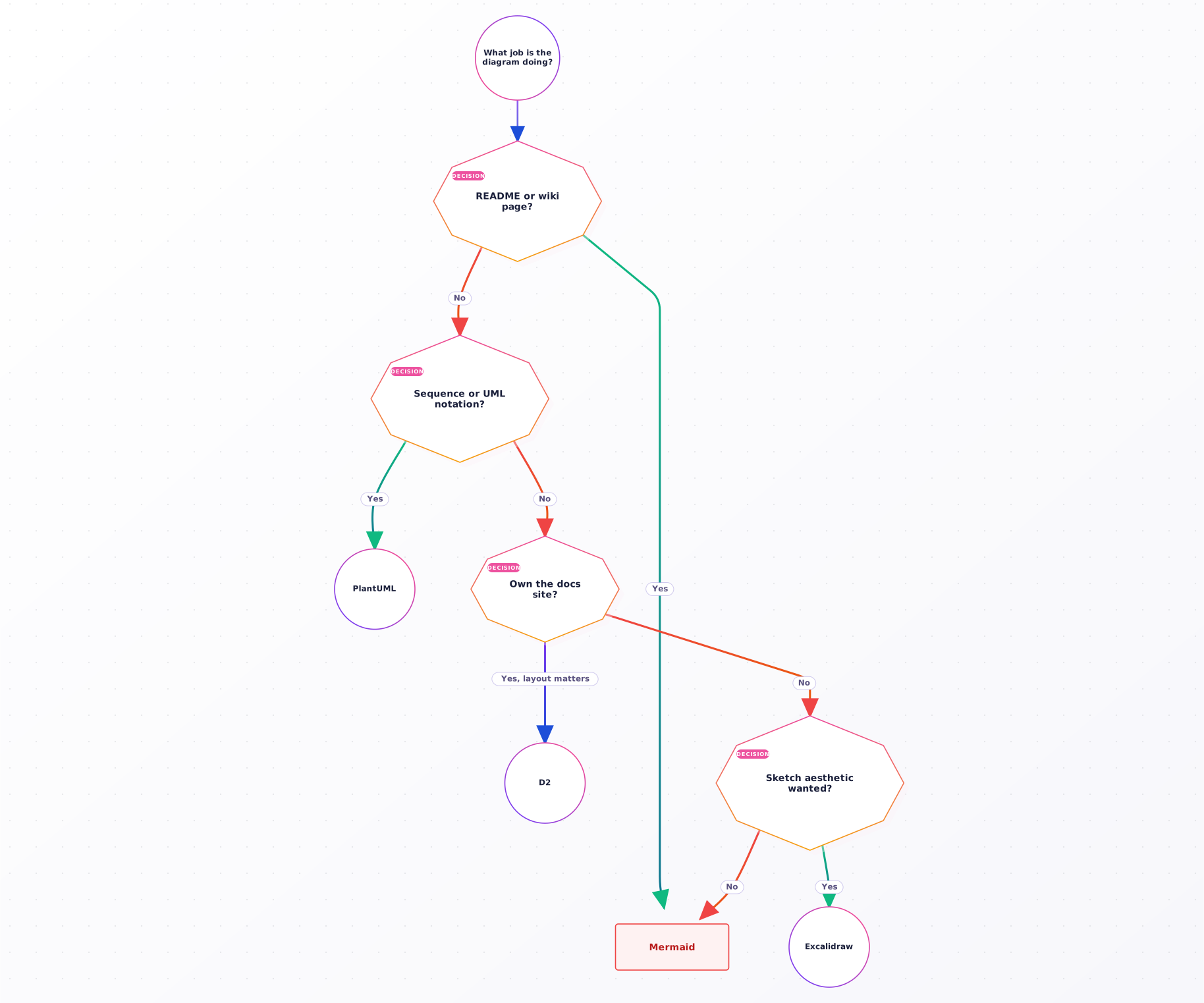
The decision tree. In practice most teams end up with Mermaid + PlantUML for different jobs; D2 enters when you own the docs site and Mermaid's layout starts hurting.
When "which tool" isn't the real question
There's a stage that comes after picking. Once you've settled on Mermaid for READMEs and PlantUML for sequence diagrams, the next problem shows up: the diagrams look nothing like each other. Mermaid's default palette, PlantUML's default palette, and whatever your product's brand colour is are three completely unrelated visual languages.
This is the part where the render layer matters more than the source layer.
The open-source path is: write your own theme overrides. Mermaid supports theme variables via the %%{init: ...}%% directive; PlantUML has skinparams. You can spend a few hours matching palettes and end up with two consistent-ish themes across the two tools. It's real work and it stays real work — every new diagram type surface has a theme to configure.
The Web UI path is: pick a rendering layer that handles the format-agnostic side for you. Beauty Diagram is one of those. Paste your Mermaid source into the editor, pick from nine production themes — classic, modern, atlas, blueprint, memphis, obsidian, slate, brutalist, atelier — and export the SVG. Then paste your PlantUML source and pick the same theme, and the two diagrams read as siblings instead of strangers. Same for .drawio XML or hand-written SVG source. (Disclosure: I work on Beauty Diagram.)
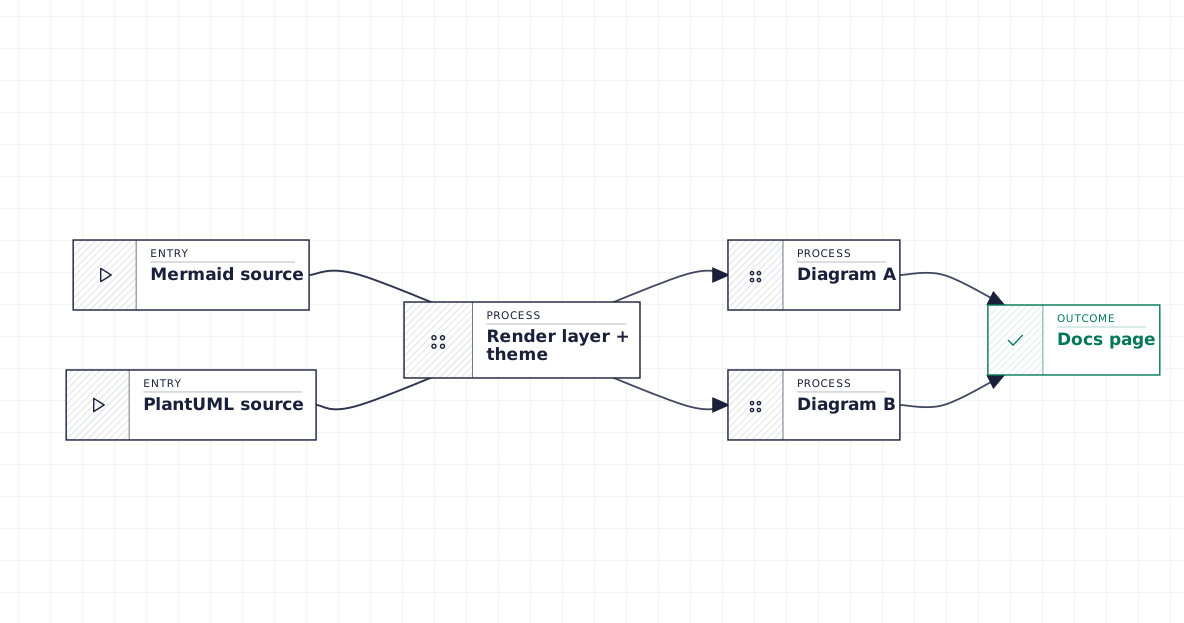
The multi-format render layer treats Mermaid and PlantUML source as two paths into the same visual language. The source you pick is a syntax decision; the theme is the design decision.
Beauty Diagram accepts Mermaid, PlantUML, .drawio XML, and text SVG as input and renders them into a shared set of production themes — so your sequence diagrams and your architecture flowcharts stop looking like they were made in different decades. (Disclosure: I work on it.)
Try the editor →For CI and repeat-render workflows, the CLI accepts the same set of source formats:
# Mermaid README diagram
npx @beauty-diagram/cli beautify architecture.mmd --theme atlas --out architecture.svg

# PlantUML sequence diagram
npx @beauty-diagram/cli beautify auth-flow.puml --theme atlas --out auth-flow.svg

# .drawio file exported from the desktop app
npx @beauty-diagram/cli beautify legacy.drawio --theme atlas --out legacy.svgSame theme, same visual language, three different sources. That's the shape of the answer once "which tool" stops being the interesting question.
Wrap-up
The takeaways as a checklist:
- Mermaid is the safe default because ubiquity wins. Reach for it for anything living inside prose or a repo README.
- PlantUML owns sequence diagrams and formal UML. Anything with participants, activations, or
<<interface>>stereotypes, this is your tool. - D2 is the layout-quality upgrade when you own the docs site and Mermaid's cramped output is finally the bottleneck. Don't switch just because it's new.
- Excalidraw is a sketch tool. Use it when "sketch" is the message, not when "diagrams as code" is the workflow.
- The render layer is worth thinking about separately from the source language. Two sources, one theme, two diagrams that read as siblings — that's often the missing move.
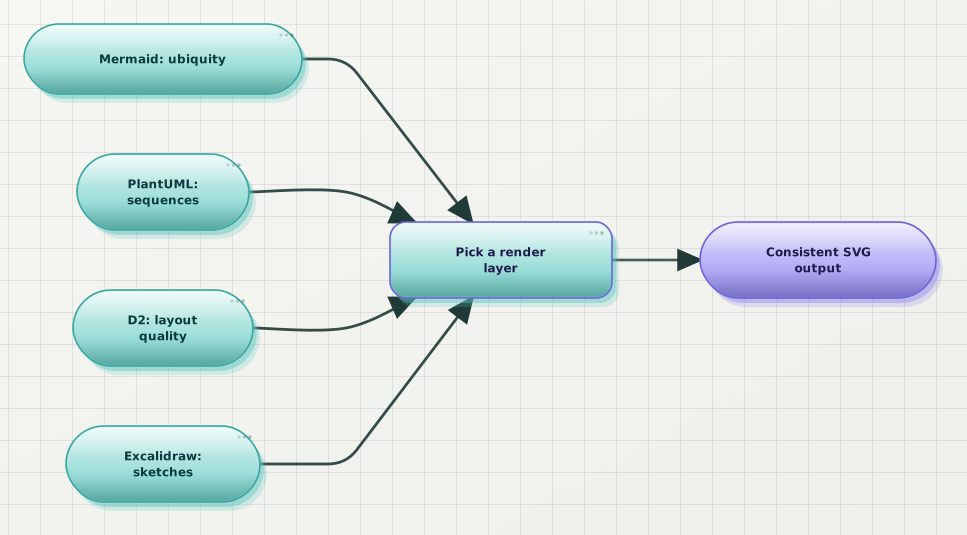
The whole post in one diagram. Pick the source language for the job the diagram is doing; pick the render layer once, for all of them.
If this was useful, drop a ❤️ and follow — I'm posting weekly on diagrams, docs, and developer ergonomics. Next week: Auto-Generate Architecture Diagrams in CI from Your Spec Files.
What's the ugliest diagram-tool combination currently living in your docs? I'm collecting stories of Mermaid + PlantUML + Excalidraw-in-a-screenshot chimeras, and the visual dissonance seems universal.
Continue reading
Which Tools Support Mermaid Natively? A Checked List
GitHub, GitLab, Notion, Obsidian, VS Code and Azure DevOps render Mermaid natively. Confluence, Slack and Google Docs do not. Every row checked against the vendor's own documentation.
Mermaid vs PlantUML in 2026: Which to Pick for Engineering Docs
Mermaid and PlantUML solve the same problem with different trade-offs. Here's a 2026 comparison on syntax, layout quality, diagram coverage, and ecosystem — with a decision rule at the end.