SequenceUser onboardingSimple
Team invite and accept
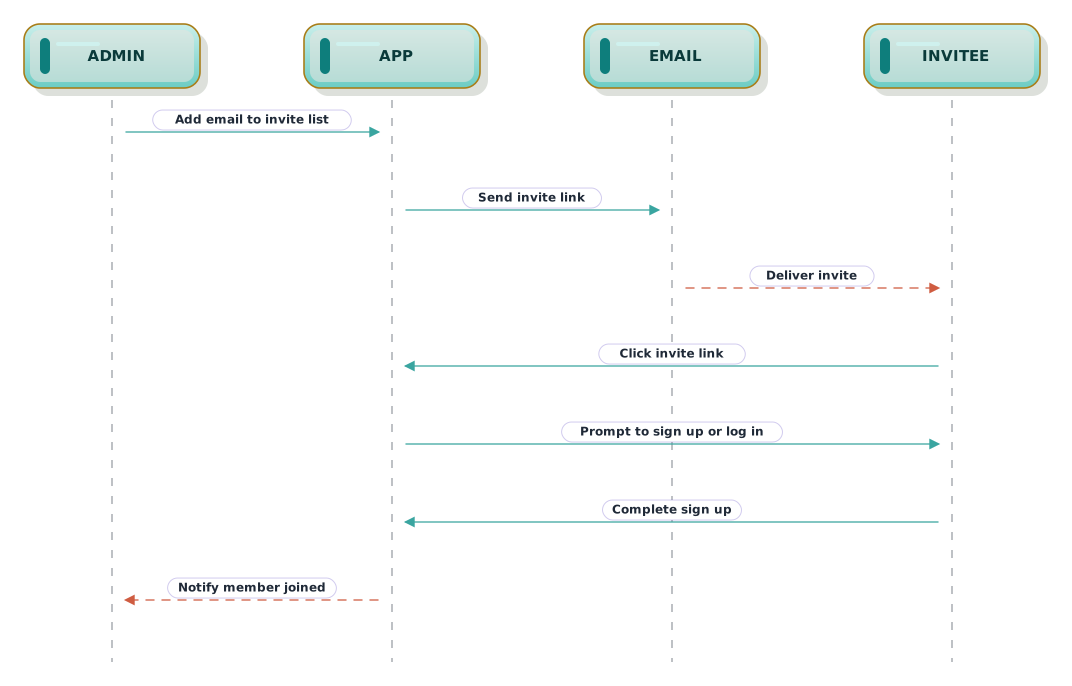
Sequence for inviting a teammate via email and accepting into the workspace.
What this diagram shows
Step 01
Invite dispatch
An admin adds the email and the app sends a signed invite link.
Step 02
Accept and sign up
The invitee follows the link and either logs in or signs up.
Step 03
Membership sync
Once accepted, the workspace adds the member and notifies the admin.
About sequence diagrams
Sequence diagrams show how participants exchange messages over time. They are a natural fit for API calls, authentication handshakes, and distributed flows where timing and order matter.
This template is written in Mermaid — plain text you can edit, version in git, and regenerate the image from any time.
View Mermaid sourcePlain-text diagram syntax — copy or edit directly.
diagram.mmd
1sequenceDiagram2 participant Admin3 participant App4 participant Email5 participant Invitee67 Admin->>App: Add email to invite list8 App->>Email: Send invite link9 Email-->>Invitee: Deliver invite10 Invitee->>App: Click invite link11 App->>Invitee: Prompt to sign up or log in12 Invitee->>App: Complete sign up13 App-->>Admin: Notify member joinedRelated
Related templates
More templates that cover similar workflows.