StateState machineSimple
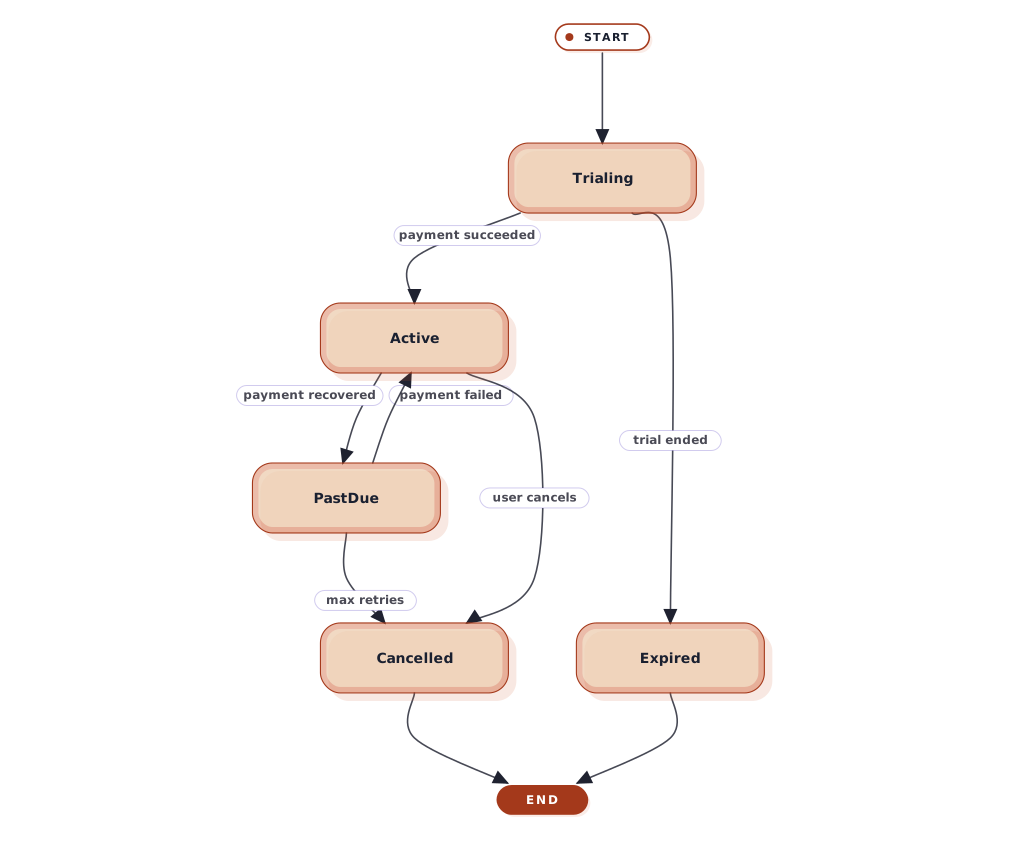
Subscription status transitions
Subscription states covering trial, active, past due, cancelled, and expired flows.
What this diagram shows
Step 01
Trial window
New subscriptions start in Trialing and convert once payment succeeds.
Step 02
Billing recovery
Failed payments slip to PastDue and can recover back to Active.
Step 03
End of life
Subscriptions end in Cancelled or Expired depending on user or billing outcome.
About state diagrams
State diagrams describe the states an entity can be in and the transitions between them. Use them for order lifecycles, subscription statuses, approval flows, or any object with meaningful modes.
This template is written in Mermaid — plain text you can edit, version in git, and regenerate the image from any time.
View Mermaid sourcePlain-text diagram syntax — copy or edit directly.
diagram.mmd
1stateDiagram-v22 [*] --> Trialing3 Trialing --> Active: payment succeeded4 Trialing --> Expired: trial ended5 Active --> PastDue: payment failed6 PastDue --> Active: payment recovered7 PastDue --> Cancelled: max retries8 Active --> Cancelled: user cancels9 Cancelled --> [*]10 Expired --> [*]Related
Related templates
More templates that cover similar workflows.